Getting Started
Getting Started
Introduction
VMware Cloud Director provides role-based access to a tenant web portal, allowing organization members to interact with resources to provision and manage vApps and virtual machines.
Creating and configuring an Organization
To grant access to an organization, the VMware Cloud Director system administrator creates the organization, allocates resources to it, and provides the URL for accessing the tenant portal. Each organization has one or more organization administrators who complete the initial configuration, add members, and establish security and resource policies. Once setup is complete, users can provision and manage virtual machines and vApps.
Organization
An organization is an administrative unit that encompasses users, groups, and computing resources. User authentication is handled at the organization level using credentials configured by the administrator. System administrators create and provision organizations, while organization administrators manage users, groups, and catalogs.
Virtual Data Centers (vDCs)
Virtual Data Centers (vDCs) provide computing, storage, and networking resources to an organization, establishing an isolated environment for storing, deploying, and operating virtual systems, as well as maintaining virtual CD and DVD media images. An organization can span multiple Virtual Data Centers.
Virtual Machines (VMs)
A virtual machine (VM) is a software-defined computer executing on a physical host. It incorporates virtual devices that emulate physical hardware capabilities, ensuring workload portability, security isolation, and simplified management. VMware Cloud Director supports native operations such as snapshot management and seamless live migration of virtual machines between hypervisor hosts.
VApp
A vApp consists of one or more virtual machines communicating over shared networks and utilizing coordinated resources and services. A single vApp can encapsulate multi-tier application architectures comprising multiple interconnected VMs.
Network Categories
VMware Cloud Director supports four primary network categories:
- External Networks
- Organization Networks (Org VDC Networks)
- NSX-T Networks
- vApp Networks
Most network configurations require backing infrastructure components, such as Edge Gateways and network pools.
Catalog
A catalog is a storage container for vApp templates and ISO/media images. Administrators and catalog authors can create catalogs, share their contents with other users or organizations, and publish them for external access across environments.
Logging in to the VMware Cloud Director Portal
To access the VMware Cloud Director management portal:
- Open your web browser and navigate to vcloud.cloud24.kz.
- On the welcome page, enter your organization name and click Next.
- Enter your username and password, then click SIGN IN.
Upon signing in to VMware Cloud Director, the data center monitoring dashboard will be displayed.
Managing Users and Roles
- To grant users access to the VMware Cloud Director cloud infrastructure, they must be imported from LDAP/Active Directory:
- Sign in to the VMware Cloud Director portal.
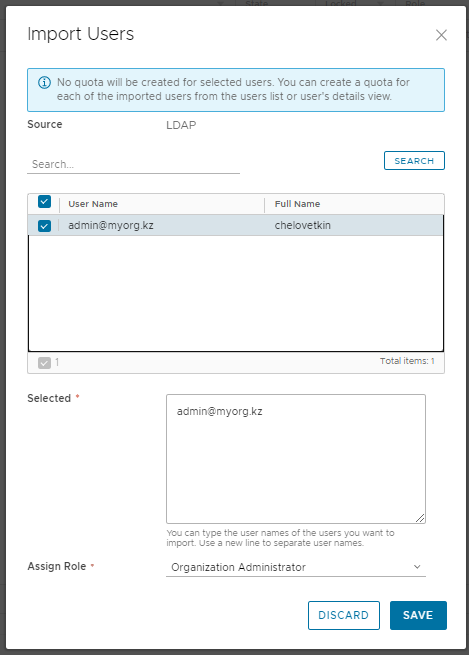
- Navigate to Administration > Users > Import Users. The LDAP user import wizard will open.
- Click Search to query directory users.
- Select the users you wish to import.
- In the Assign Role field, select the target role to assign to the selected users.
- Click Save.
Once completed, access to the organization will be granted to all imported user accounts.